<?xml version="1.0" encoding="utf-8"?><feed xmlns="http://www.w3.org/2005/Atom" ><generator uri="https://jekyllrb.com/" version="3.10.0">Jekyll</generator><link href="https://marcusfelling.com/feed.xml" rel="self" type="application/atom+xml" /><link href="https://marcusfelling.com/" rel="alternate" type="text/html" /><updated>2026-03-11T14:47:18-04:00</updated><id>https://marcusfelling.com/feed.xml</id><title type="html">Home</title><subtitle>A blog about things I learn at the keyboard: DevOps, CI/CD, Cloud, Automation, to name a few...</subtitle><author><name>Marcus Felling</name></author><entry><title type="html">Building an AI Agent Squad for Your Repo</title><link href="https://marcusfelling.com/blog/2026/building-an-ai-agent-squad-for-your-repo" rel="alternate" type="text/html" title="Building an AI Agent Squad for Your Repo" /><published>2026-02-26T00:00:00-05:00</published><updated>2026-02-26T00:00:00-05:00</updated><id>https://marcusfelling.com/blog/2026/building-an-ai-agent-squad-for-your-repo</id><content type="html" xml:base="https://marcusfelling.com/blog/2026/building-an-ai-agent-squad-for-your-repo"><![CDATA[<p>What if your repo had a whole team of AI agents: a lead, a frontend dev, a tester, a content writer, each with their own context window, persistent memory, and defined boundaries? That’s exactly what <a href="https://github.com/bradygaster/squad">Squad</a> gives you.</p>

<p><a href="https://github.com/bradygaster/squad">Squad</a> is an open-source framework conceived by <a href="https://github.com/bradygaster">Brady Gaster</a> that creates an AI development team through GitHub Copilot. You describe what you’re building, and Squad proposes a team of specialists that live in your repo as files. They persist across sessions, learn your codebase, share decisions, and get better the more you use them.</p>

<p>It’s not a chatbot wearing hats. Each team member runs in its own context, reads only its own knowledge, and writes back what it learned.</p>

<p>I set it up for the repo of this blog. Here’s what I learned.</p>

<h2 id="installing-squad">Installing Squad</h2>

<p>Getting started takes two commands:</p>

<div class="language-bash highlighter-rouge"><div class="highlight"><pre class="highlight"><code>npm i <span class="nt">-g</span> @bradygaster/squad-cli
squad
</code></pre></div></div>

<p>For additional installation options (including npx and cloning from source), see the <a href="https://bradygaster.github.io/squad/docs/get-started/installation/">official installation guide</a>.</p>

<p>Then open Copilot in VS Code, type <code class="language-plaintext highlighter-rouge">@squad</code>, and tell it what you’re building:</p>

<div class="language-text highlighter-rouge"><div class="highlight"><pre class="highlight"><code>I'm starting a new project. Set up the team.
</code></pre></div></div>

<p>Squad proposes a team, each member named from a persistent thematic cast. You say yes. They’re ready.</p>

<h2 id="the-team">The Team</h2>

<p>Squad generated a team tailored to my blog’s needs:</p>

<ul>
  <li>🏗️ <strong>Mal</strong> / Lead: architecture, code review, cross-agent coordination</li>
  <li>⚛️ <strong>Kaylee</strong> / Designer/Dev: CSS, layout, responsive design</li>
  <li>📝 <strong>Wash</strong> / Content Dev: blog posts, frontmatter, SEO</li>
  <li>🧪 <strong>Zoe</strong> / Tester: Playwright tests, accessibility, performance</li>
  <li>📋 <strong>Scribe</strong> / Session logger: decisions, session summaries</li>
  <li>🔄 <strong>Ralph</strong> / Work monitor: backlog, issue triage, CI monitoring</li>
</ul>

<p>The names come from a persistent casting system. Once assigned, they stick. Anyone who clones the repo gets the same team with the same cast.</p>

<p>Each agent has a <strong>charter</strong> (<code class="language-plaintext highlighter-rouge">charter.md</code>) that defines scope and boundaries: what they own, what files they can modify, and critically, what they <em>don’t</em> touch. Kaylee owns CSS but never writes tests. Wash owns blog posts but never touches layout. These boundaries prevent agents from stepping on each other.</p>

<h2 id="what-gets-created">What Gets Created</h2>

<p>Everything lives in a <code class="language-plaintext highlighter-rouge">.squad/</code> directory:</p>

<div class="language-text highlighter-rouge"><div class="highlight"><pre class="highlight"><code>.squad/
├── team.md            # Roster
├── routing.md         # Who handles what
├── decisions.md       # Shared brain
├── ceremonies.md      # Design reviews, retros
├── casting/
│   ├── policy.json
│   ├── registry.json
│   └── history.json
├── agents/
│   ├── kaylee/
│   │   ├── charter.md # Identity, expertise, voice
│   │   └── history.md # Project-specific learnings
│   ├── wash/
│   │   ├── charter.md
│   │   └── history.md
│   └── zoe/
│       ├── charter.md
│       └── history.md
└── log/               # Session history
</code></pre></div></div>

<p>Commit this folder. Your team persists. Names persist. It’s all in git.</p>

<h2 id="parallel-agents-not-sequential">Parallel Agents, Not Sequential</h2>

<p>This is the part that surprised me most. When you give Squad a task, the coordinator launches every agent that can usefully start, simultaneously:</p>

<div class="language-text highlighter-rouge"><div class="highlight"><pre class="highlight"><code>You: "Team, redesign the blog"
  🏗️ Mal    → analyzing architecture requirements
  ⚛️ Kaylee → building new layout             (all launched
  🧪 Zoe    → writing test cases from spec     in parallel)
  📋 Scribe → logging everything
</code></pre></div></div>

<p>When agents finish, the coordinator immediately chains follow-up work. Tests reveal edge cases, another agent picks them up, no waiting for you to ask.</p>

<p>Each agent gets its own context window. With Claude Sonnet 4 or Claude Opus 4’s 200K token window, and the coordinator kept thin, each agent has ~78–83% of its context available for actual work. Fan out to 5 agents and you’re working with ~1M tokens of total reasoning capacity.</p>

<h2 id="knowledge-that-compounds">Knowledge That Compounds</h2>

<p>Every time an agent works, it writes lasting learnings to its <code class="language-plaintext highlighter-rouge">history.md</code>. After a few sessions, agents know your conventions, your preferences, your architecture. They stop asking questions they’ve already answered.</p>

<p>Team-wide decisions live in <code class="language-plaintext highlighter-rouge">decisions.md</code>, which every agent reads before working. Personal knowledge stays in each agent’s <code class="language-plaintext highlighter-rouge">history.md</code>. The Scribe keeps session logs searchable in <code class="language-plaintext highlighter-rouge">log/</code>.</p>

<p><strong>Frontend agent knowledge over time:</strong>
Stack, framework → Components, routing → Design system, a11y conventions</p>

<p><strong>Lead agent knowledge over time:</strong>
Scope, roster → Trade-offs, risks → Full project history, tech debt map</p>

<p><strong>Tester agent knowledge over time:</strong>
Framework, first cases → Edge case catalog → Regression patterns, coverage gaps</p>

<h2 id="issue-integration">Issue Integration</h2>

<p>Squad ties into GitHub Issues with a labeling workflow:</p>

<ol>
  <li>Label an issue <code class="language-plaintext highlighter-rouge">squad</code>. The Lead auto-triages it, determines who should handle it, and applies the right <code class="language-plaintext highlighter-rouge">squad:{member}</code> label.</li>
  <li>The assigned member picks up the issue in their next Copilot session (or automatically if Copilot coding agent is enabled).</li>
  <li>Labels sync automatically from your team roster via the <code class="language-plaintext highlighter-rouge">sync-squad-labels</code> workflow.</li>
</ol>

<h2 id="what-i-learned">What I Learned</h2>

<p><strong>The first session is the least capable.</strong> Knowledge compounds. By the third or fourth session, agents were making decisions based on prior context without me having to repeat anything.</p>

<p><strong>Boundaries matter more than capabilities.</strong> Clear charters that define what an agent <em>doesn’t</em> do are more important than what it can do. Overlap is the enemy.</p>

<p><strong>The Scribe is secretly the most important agent.</strong> Coming back the next day to a searchable log of every decision and session is invaluable. Context is never lost.</p>

<p>If you’re using GitHub Copilot for your repo(s) today, give Squad a try. The jump from one agent to a coordinated team is pretty awesome, and it all lives in git.</p>]]></content><author><name>Marcus Felling</name></author><category term="AI" /><summary type="html"><![CDATA[How I set up Squad, an open-source AI agent team framework, and what I learned along the way]]></summary></entry><entry><title type="html">Shipping an AI Agent MVP: What Actually Worked</title><link href="https://marcusfelling.com/blog/2026/three-day-hackathon-shipping-ai-agent-mvps" rel="alternate" type="text/html" title="Shipping an AI Agent MVP: What Actually Worked" /><published>2026-01-20T00:00:00-05:00</published><updated>2026-01-20T00:00:00-05:00</updated><id>https://marcusfelling.com/blog/2026/what-three-day-hackathon-taught-me-shipping-ai-agent-mvps-real-stakeholders</id><content type="html" xml:base="https://marcusfelling.com/blog/2026/three-day-hackathon-shipping-ai-agent-mvps"><![CDATA[<p>I recently led a 3 day hackathon to build an AI solution that streamlines our monthly business reviews for our Microsoft direct sales ecommerce store (think Surface devices, M365, Xbox). Our team had been spending way too much time talking at high levels and planning what to build; this was an opportunity to dive in and start executing. In this post I’ll summarize the practical lessons learned from the experience.</p>

<p>To set some context, our team builds on <a href="https://learn.microsoft.com/en-us/fabric/fundamentals/microsoft-fabric-overview">Microsoft Fabric</a> (data analytics SaaS platform) which recently announced <a href="https://learn.microsoft.com/en-us/fabric/iq/overview">Fabric IQ</a> that included new features/capabilities such as Ontology and Data Agents, so the timing worked out great to kick the tires on what’s actually possible in practice.</p>

<hr />

<h2 id="tldr">TL;DR</h2>

<ul>
  <li><strong>Start with the real problem</strong>, not the tools</li>
  <li><strong>Cut scope ruthlessly</strong> and ship something valuable, not everything</li>
  <li><strong>Keep the delivery simple</strong> while you’re figuring out if it even works</li>
  <li><strong>Break big agents into smaller</strong>, more focused sub agents</li>
  <li><strong>Engage stakeholders</strong> throughout the process</li>
  <li><strong>Test often</strong> and iterate fast</li>
</ul>

<h2 id="begin-with-a-clear-business-problem">Begin With a Clear Business Problem</h2>

<p>Instead of jumping straight into tool selection, we focused on understanding the problem first. Before the hack, we had a brainstorming session to come up with a list of high impact use cases we could tackle. We landed on preparing monthly business reviews, specifically, analyzing KPI shifts, and writing up narratives. This takes our team a lot of time (hundreds of hours) and a lot of it gets repeated every single month. That helped us figure out what actually needed automating and what value an AI agent could realistically add in three days.</p>

<p>When we talked to stakeholders, they were pretty clear about what they needed: spot the biggest KPI moves, connect those changes to contextual factors, and provide concise summaries for leadership review. Those requirements told us which agent capabilities actually mattered and confirmed that building KPI and commentary prototypes was worth the effort.</p>

<h2 id="reduce-scope-early-and-create-a-practical-mvp">Reduce Scope Early and Create a Practical MVP</h2>

<p>There are a ton of options when it comes to user experience and how stakeholders would interact with our agents. To keep it simple, we decided the MVP would generate insights on a schedule and deliver them by email. It was more important that we get the outputs in the hands of the stakeholders ASAP to provide feedback and validate, than spend a bunch of time on a polished interface that provided garbage outputs.</p>

<p>From a tooling perspective, this allowed us to leverage tools we already had experience with to move fast: we chose Logic Apps to orchestrate Fabric data agents, passing outputs as variables, and merging them together to send the final email. There was quite a learning curve that came with ramping up on AI native orchestrators (Copilot Studio, AI Foundry, etc.) and environment setup, that just wasn’t realistic for a 3 day timeline.</p>

<h2 id="break-big-agents-into-smaller-more-focused-sub-agents">Break Big Agents Into Smaller, More Focused Sub Agents</h2>

<p>We started with a plan for two big agents: one for KPI analysis, one for writing narratives. As we threw more and more data sources at our agents, we found their accuracy turned to slop. We moved to finely scoped sub agents that were specialized for their tasks. We stripped out tables and measures we didn’t need, cleaned up the filtering logic, and set the agents to use narrower data sources. Those tweaks stabilized things and made sure each piece was actually doing what it was supposed to do. When we split up the work and trimmed unnecessary complexity from the agents, <strong>accuracy went way up</strong>. We now have 6 (and growing) specialized agents…</p>

<h3 id="lessons-learned-fabric-data-agents">Lessons Learned: Fabric Data Agents</h3>

<p>Specific to Fabric data agents, we experienced issues like using incorrect DAX queries and tables/columns that weren’t even in scope. To overcome this, we implemented a few practices:</p>

<blockquote>
  <p><strong>Good Practices for Fabric Data Agents:</strong></p>

  <ul>
    <li>Keep the Semantic Model as clear as possible, especially custom DAX measures</li>
    <li>Use the <a href="https://learn.microsoft.com/en-us/power-bi/create-reports/copilot-prepare-data-ai">Prepare your data for AI</a> tool on the published semantic model</li>
    <li>Select only the essential measures and tables when creating the agent</li>
    <li>Provide explicit instructions to the agent about when it should perform its own calculations</li>
  </ul>
</blockquote>

<h2 id="engage-stakeholders-throughout-the-process">Engage Stakeholders Throughout the Process</h2>

<p>Having stakeholders involved throughout the hackathon was <strong>extremely valuable</strong>. This helped us continuously validate what we were building and speed up the feedback loop. Which KPI moves actually mattered, how they wanted the summaries written, and what context was missing, etc. Bringing them in early meant we didn’t waste time building stuff nobody wanted. We could pivot fast based on what they told us.</p>

<blockquote>
  <p><strong>Key Insight:</strong> Early stakeholder engagement turned potential weeks of rework into hours of quick adjustments. Their feedback directly shaped which agents we prioritized and how we structured the outputs.</p>
</blockquote>

<hr />

<h2 id="closing-thoughts">Closing Thoughts</h2>

<p>Three days gave us a chance to see what AI-powered agents could actually do. And honestly, it showed that with a tight timeline, you can still ship something real if you <strong>nail the problem</strong>, <strong>keep scope tight</strong>, and <strong>iterate like crazy</strong>.</p>

<p>Since the hackathon, we’ve come a long way with our solution but this gave us a jump start on the work.</p>]]></content><author><name>Marcus Felling</name></author><category term="AI" /><summary type="html"><![CDATA[Shipping an AI Agent MVP: What Actually Worked]]></summary></entry><entry><title type="html">⏩ Optimizing GitHub Actions Workflows for Speed and Efficiency</title><link href="https://marcusfelling.com/blog/2025/optimizing-github-actions-workflows-for-speed" rel="alternate" type="text/html" title="⏩ Optimizing GitHub Actions Workflows for Speed and Efficiency" /><published>2025-02-28T00:00:00-05:00</published><updated>2025-02-28T00:00:00-05:00</updated><id>https://marcusfelling.com/blog/2025/optimizing-github-actions-workflows-for-speed</id><content type="html" xml:base="https://marcusfelling.com/blog/2025/optimizing-github-actions-workflows-for-speed"><![CDATA[<p>Slow CI/CD pipelines directly impact developer productivity and deployment frequency. When pull request checks take 15+ minutes to complete, developers context-switch to other tasks, breaking their flow and reducing productivity. Additionally, GitHub Actions charges by the minute, so inefficient workflows literally cost you money.</p>

<p>I’ll go through some optimization techniques I’ve found to be effective:</p>

<ul>
  <li><a href="#caching-dependencies">Caching Dependencies</a></li>
  <li><a href="#optimize-docker-usage">Optimize Docker Usage</a></li>
  <li><a href="#strategic-job-splitting-and-parallelization">Strategic Job Splitting and Parallelization</a></li>
  <li><a href="#matrix-builds-for-testing-efficiently">Matrix Builds for Testing Efficiently</a></li>
  <li><a href="#selective-testing-with-path-filtering">Selective Testing with Path Filtering</a></li>
  <li><a href="#self-hosted-runners-for-specialized-workloads">Self-hosted Runners for Specialized Workloads</a></li>
  <li><a href="#monitoring-your-workflow-performance">Monitoring Your Workflow Performance</a></li>
  <li><a href="#conclusion">Conclusion</a></li>
</ul>

<h2 id="caching-dependencies">Caching Dependencies</h2>

<p>The most immediate win for most workflows is proper dependency caching:</p>

<div class="language-yaml highlighter-rouge"><div class="highlight"><pre class="highlight"><code><span class="na">jobs</span><span class="pi">:</span>
  <span class="na">build</span><span class="pi">:</span>
    <span class="na">runs-on</span><span class="pi">:</span> <span class="s">ubuntu-latest</span>
    <span class="na">steps</span><span class="pi">:</span>
      <span class="pi">-</span> <span class="na">uses</span><span class="pi">:</span> <span class="s">actions/checkout@v3</span>
      
      <span class="pi">-</span> <span class="na">name</span><span class="pi">:</span> <span class="s">Set up Node.js</span>
        <span class="na">uses</span><span class="pi">:</span> <span class="s">actions/setup-node@v3</span>
        <span class="na">with</span><span class="pi">:</span>
          <span class="na">node-version</span><span class="pi">:</span> <span class="s1">'</span><span class="s">16'</span>
          
      <span class="pi">-</span> <span class="na">name</span><span class="pi">:</span> <span class="s">Cache dependencies</span>
        <span class="na">uses</span><span class="pi">:</span> <span class="s">actions/cache@v3</span>
        <span class="na">with</span><span class="pi">:</span>
          <span class="na">path</span><span class="pi">:</span> <span class="pi">|</span>
            <span class="s">~/.npm</span>
            <span class="s">node_modules</span>
          <span class="na">key</span><span class="pi">:</span> <span class="s">${{ runner.os }}-node-${{ hashFiles('**/package-lock.json') }}</span>
          <span class="na">restore-keys</span><span class="pi">:</span> <span class="pi">|</span>
            <span class="s">${{ runner.os }}-node-</span>
            
      <span class="pi">-</span> <span class="na">name</span><span class="pi">:</span> <span class="s">Install dependencies</span>
        <span class="na">run</span><span class="pi">:</span> <span class="s">npm ci --prefer-offline --no-audit</span>
</code></pre></div></div>

<p>The above example includes several optimizations:</p>
<ul>
  <li>Caching both <code class="language-plaintext highlighter-rouge">~/.npm</code> and <code class="language-plaintext highlighter-rouge">node_modules</code></li>
  <li>Using lockfile hashing for cache keys</li>
  <li>Fallback cache keys for partial hits</li>
  <li><code class="language-plaintext highlighter-rouge">--prefer-offline</code> flag to prioritize cached packages</li>
</ul>

<h2 id="optimize-docker-usage">Optimize Docker Usage</h2>

<p>For workflows using Docker, image layering and caching are critical:</p>

<div class="language-yaml highlighter-rouge"><div class="highlight"><pre class="highlight"><code><span class="na">jobs</span><span class="pi">:</span>
  <span class="na">docker-build</span><span class="pi">:</span>
    <span class="na">runs-on</span><span class="pi">:</span> <span class="s">ubuntu-latest</span>
    <span class="na">steps</span><span class="pi">:</span>
      <span class="pi">-</span> <span class="na">uses</span><span class="pi">:</span> <span class="s">actions/checkout@v3</span>
      
      <span class="pi">-</span> <span class="na">name</span><span class="pi">:</span> <span class="s">Set up Docker Buildx</span>
        <span class="na">uses</span><span class="pi">:</span> <span class="s">docker/setup-buildx-action@v2</span>
        
      <span class="pi">-</span> <span class="na">name</span><span class="pi">:</span> <span class="s">Cache Docker layers</span>
        <span class="na">uses</span><span class="pi">:</span> <span class="s">actions/cache@v3</span>
        <span class="na">with</span><span class="pi">:</span>
          <span class="na">path</span><span class="pi">:</span> <span class="s">/tmp/.buildx-cache</span>
          <span class="na">key</span><span class="pi">:</span> <span class="s">${{ runner.os }}-buildx-${{ github.sha }}</span>
          <span class="na">restore-keys</span><span class="pi">:</span> <span class="pi">|</span>
            <span class="s">${{ runner.os }}-buildx-</span>
            
      <span class="pi">-</span> <span class="na">name</span><span class="pi">:</span> <span class="s">Build and push</span>
        <span class="na">uses</span><span class="pi">:</span> <span class="s">docker/build-push-action@v4</span>
        <span class="na">with</span><span class="pi">:</span>
          <span class="na">context</span><span class="pi">:</span> <span class="s">.</span>
          <span class="na">push</span><span class="pi">:</span> <span class="no">false</span>
          <span class="na">cache-from</span><span class="pi">:</span> <span class="s">type=local,src=/tmp/.buildx-cache</span>
          <span class="na">cache-to</span><span class="pi">:</span> <span class="s">type=local,dest=/tmp/.buildx-cache-new,mode=max</span>
</code></pre></div></div>

<p>After your build, add this step to prevent cache size explosion:</p>

<div class="language-yaml highlighter-rouge"><div class="highlight"><pre class="highlight"><code>      <span class="pi">-</span> <span class="na">name</span><span class="pi">:</span> <span class="s">Move cache</span>
        <span class="na">run</span><span class="pi">:</span> <span class="pi">|</span>
          <span class="s">rm -rf /tmp/.buildx-cache</span>
          <span class="s">mv /tmp/.buildx-cache-new /tmp/.buildx-cache</span>
</code></pre></div></div>

<h2 id="strategic-job-splitting-and-parallelization">Strategic Job Splitting and Parallelization</h2>

<p>Instead of sequential steps, split work into parallel jobs when possible:</p>

<div class="language-yaml highlighter-rouge"><div class="highlight"><pre class="highlight"><code><span class="na">jobs</span><span class="pi">:</span>
  <span class="na">lint</span><span class="pi">:</span>
    <span class="na">runs-on</span><span class="pi">:</span> <span class="s">ubuntu-latest</span>
    <span class="na">steps</span><span class="pi">:</span>
      <span class="pi">-</span> <span class="na">uses</span><span class="pi">:</span> <span class="s">actions/checkout@v3</span>
      <span class="pi">-</span> <span class="na">uses</span><span class="pi">:</span> <span class="s">actions/setup-node@v3</span>
        <span class="c1"># ...lint setup and execution</span>
        
  <span class="na">test</span><span class="pi">:</span>
    <span class="na">runs-on</span><span class="pi">:</span> <span class="s">ubuntu-latest</span>
    <span class="na">steps</span><span class="pi">:</span>
      <span class="pi">-</span> <span class="na">uses</span><span class="pi">:</span> <span class="s">actions/checkout@v3</span>
      <span class="pi">-</span> <span class="na">uses</span><span class="pi">:</span> <span class="s">actions/setup-node@v3</span>
        <span class="c1"># ...test setup and execution</span>
        
  <span class="na">build</span><span class="pi">:</span>
    <span class="na">runs-on</span><span class="pi">:</span> <span class="s">ubuntu-latest</span>
    <span class="na">needs</span><span class="pi">:</span> <span class="pi">[</span><span class="nv">lint</span><span class="pi">,</span> <span class="nv">test</span><span class="pi">]</span>
    <span class="c1"># This job only runs after lint and test complete successfully</span>
</code></pre></div></div>

<h2 id="matrix-builds-for-testing-efficiently">Matrix Builds for Testing Efficiently</h2>

<p>For multi-environment testing, use matrix builds:</p>

<div class="language-yaml highlighter-rouge"><div class="highlight"><pre class="highlight"><code><span class="na">jobs</span><span class="pi">:</span>
  <span class="na">test</span><span class="pi">:</span>
    <span class="na">runs-on</span><span class="pi">:</span> <span class="s">ubuntu-latest</span>
    <span class="na">strategy</span><span class="pi">:</span>
      <span class="na">matrix</span><span class="pi">:</span>
        <span class="na">node-version</span><span class="pi">:</span> <span class="pi">[</span><span class="nv">14</span><span class="pi">,</span> <span class="nv">16</span><span class="pi">,</span> <span class="nv">18</span><span class="pi">]</span>
    <span class="na">steps</span><span class="pi">:</span>
      <span class="pi">-</span> <span class="na">uses</span><span class="pi">:</span> <span class="s">actions/checkout@v3</span>
      <span class="pi">-</span> <span class="na">name</span><span class="pi">:</span> <span class="s">Use Node.js ${{ matrix.node-version }}</span>
        <span class="na">uses</span><span class="pi">:</span> <span class="s">actions/setup-node@v3</span>
        <span class="na">with</span><span class="pi">:</span>
          <span class="na">node-version</span><span class="pi">:</span> <span class="s">${{ matrix.node-version }}</span>
      <span class="pi">-</span> <span class="na">run</span><span class="pi">:</span> <span class="s">npm ci</span>
      <span class="pi">-</span> <span class="na">run</span><span class="pi">:</span> <span class="s">npm test</span>
</code></pre></div></div>

<h2 id="selective-testing-with-path-filtering">Selective Testing with Path Filtering</h2>

<p>Avoid running unnecessary jobs by filtering based on changed paths:</p>

<div class="language-yaml highlighter-rouge"><div class="highlight"><pre class="highlight"><code><span class="na">jobs</span><span class="pi">:</span>
  <span class="na">frontend-tests</span><span class="pi">:</span>
    <span class="na">if</span><span class="pi">:</span> <span class="pi">|</span>
      <span class="s">github.event_name == 'pull_request' &amp;&amp;</span>
      <span class="s">(github.event.pull_request.base.ref == 'main' ||</span>
       <span class="s">contains(github.event.pull_request.labels.*.name, 'run-all-tests'))</span>
    <span class="na">runs-on</span><span class="pi">:</span> <span class="s">ubuntu-latest</span>
    <span class="na">steps</span><span class="pi">:</span>
      <span class="pi">-</span> <span class="na">uses</span><span class="pi">:</span> <span class="s">actions/checkout@v3</span>
      <span class="pi">-</span> <span class="na">uses</span><span class="pi">:</span> <span class="s">dorny/paths-filter@v2</span>
        <span class="na">id</span><span class="pi">:</span> <span class="s">filter</span>
        <span class="na">with</span><span class="pi">:</span>
          <span class="na">filters</span><span class="pi">:</span> <span class="pi">|</span>
            <span class="s">frontend:</span>
              <span class="s">- 'frontend/**'</span>
              <span class="s">- 'shared/**'</span>
            <span class="no">  </span>
      <span class="pi">-</span> <span class="na">name</span><span class="pi">:</span> <span class="s">Frontend Tests</span>
        <span class="na">if</span><span class="pi">:</span> <span class="s">steps.filter.outputs.frontend == 'true'</span>
        <span class="na">run</span><span class="pi">:</span> <span class="s">npm test</span>
</code></pre></div></div>

<h2 id="self-hosted-runners-for-specialized-workloads">Self-hosted Runners for Specialized Workloads</h2>

<p>For specific needs like GPU access or large compute requirements, <a href="https://docs.github.com/en/actions/hosting-your-own-runners/managing-self-hosted-runners/about-self-hosted-runners">self-hosted runners</a> can dramatically improve performance:</p>

<div class="language-yaml highlighter-rouge"><div class="highlight"><pre class="highlight"><code><span class="na">jobs</span><span class="pi">:</span>
  <span class="na">gpu-training</span><span class="pi">:</span>
    <span class="na">runs-on</span><span class="pi">:</span> <span class="s">self-hosted-gpu</span>
    <span class="na">steps</span><span class="pi">:</span>
      <span class="pi">-</span> <span class="na">uses</span><span class="pi">:</span> <span class="s">actions/checkout@v3</span>
      <span class="c1"># GPU-intensive tasks here</span>
</code></pre></div></div>

<h2 id="monitoring-your-workflow-performance">Monitoring Your Workflow Performance</h2>

<p>GitHub provides insights into workflow run times. Use the GitHub API to track this data over time:</p>

<div class="language-typescript highlighter-rouge"><div class="highlight"><pre class="highlight"><code><span class="k">async</span> <span class="kd">function</span> <span class="nx">getWorkflowRunTimes</span><span class="p">(</span><span class="nx">owner</span><span class="p">,</span> <span class="nx">repo</span><span class="p">,</span> <span class="nx">workflow_id</span><span class="p">)</span> <span class="p">{</span>
  <span class="kd">const</span> <span class="p">{</span> <span class="nx">Octokit</span> <span class="p">}</span> <span class="o">=</span> <span class="nx">require</span><span class="p">(</span><span class="dl">"</span><span class="s2">@octokit/rest</span><span class="dl">"</span><span class="p">);</span>
  <span class="kd">const</span> <span class="nx">octokit</span> <span class="o">=</span> <span class="k">new</span> <span class="nx">Octokit</span><span class="p">({</span> <span class="na">auth</span><span class="p">:</span> <span class="nx">process</span><span class="p">.</span><span class="nx">env</span><span class="p">.</span><span class="nx">GITHUB_TOKEN</span> <span class="p">});</span>
  
  <span class="kd">const</span> <span class="nx">runs</span> <span class="o">=</span> <span class="k">await</span> <span class="nx">octokit</span><span class="p">.</span><span class="nx">actions</span><span class="p">.</span><span class="nx">listWorkflowRuns</span><span class="p">({</span>
    <span class="nx">owner</span><span class="p">,</span>
    <span class="nx">repo</span><span class="p">,</span>
    <span class="nx">workflow_id</span><span class="p">,</span>
  <span class="p">});</span>
  
  <span class="k">return</span> <span class="nx">runs</span><span class="p">.</span><span class="nx">data</span><span class="p">.</span><span class="nx">workflow_runs</span><span class="p">.</span><span class="nx">map</span><span class="p">(</span><span class="nx">run</span> <span class="o">=&gt;</span> <span class="p">({</span>
    <span class="na">id</span><span class="p">:</span> <span class="nx">run</span><span class="p">.</span><span class="nx">id</span><span class="p">,</span>
    <span class="na">duration</span><span class="p">:</span> <span class="k">new</span> <span class="nb">Date</span><span class="p">(</span><span class="nx">run</span><span class="p">.</span><span class="nx">updated_at</span><span class="p">)</span> <span class="o">-</span> <span class="k">new</span> <span class="nb">Date</span><span class="p">(</span><span class="nx">run</span><span class="p">.</span><span class="nx">created_at</span><span class="p">),</span>
    <span class="na">conclusion</span><span class="p">:</span> <span class="nx">run</span><span class="p">.</span><span class="nx">conclusion</span>
  <span class="p">}));</span>
<span class="p">}</span>
</code></pre></div></div>

<h2 id="conclusion">Conclusion</h2>

<p>Optimizing GitHub Actions workflows is an ongoing process. Start with the high-impact items like caching and job parallelization, then iteratively improve based on metrics. The reward is not just faster builds but happier developers and lower costs.</p>]]></content><author><name>Marcus Felling</name></author><category term="GitHub Actions" /><category term="CICD" /><summary type="html"><![CDATA[Optimizing GitHub Actions Workflows for Speed and Efficiency]]></summary></entry><entry><title type="html">Control Your Windows VPN Connections from VS Code</title><link href="https://marcusfelling.com/blog/2025/vpn-toggle-vscode-extension" rel="alternate" type="text/html" title="Control Your Windows VPN Connections from VS Code" /><published>2025-02-12T00:00:00-05:00</published><updated>2025-02-12T00:00:00-05:00</updated><id>https://marcusfelling.com/blog/2025/vpn-toggle-vscode-extension</id><content type="html" xml:base="https://marcusfelling.com/blog/2025/vpn-toggle-vscode-extension"><![CDATA[<p>Ever get annoyed having to click through Windows settings just to toggle your VPN connection? Yeah, me too. That’s why I built a VS Code extension to handle it.</p>

<h2 id="why-i-built-this">Why I Built This</h2>

<p>The more I can do without touching my mouse, the happier I am. Switching VPN connections was one of those small but frequent tasks that bugged me - too many clicks just to turn a VPN on or off. Since I’m often already in VS Code when a VPN connection is required, why not control it from there?</p>

<h2 id="what-it-does">What It Does</h2>

<p>The <a href="https://marketplace.visualstudio.com/items?itemName=MFelling.vpn-toggle">VPN Toggle extension</a> lets you:</p>
<ul>
  <li>Toggle any Windows VPN connection on/off with commands</li>
  <li>Works with any VPN connection set up in Windows</li>
</ul>

<p><img src="https://github.com/user-attachments/assets/e699a3af-c323-4fec-9ac8-1b67fcf4dae1" alt="demo" class="img-fluid" /></p>

<h2 id="how-to-use-it">How to Use It</h2>

<ol>
  <li>Install the extension from the <a href="https://marketplace.visualstudio.com/items?itemName=MFelling.vpn-toggle">VS Code Marketplace</a></li>
  <li>Press <code class="language-plaintext highlighter-rouge">Ctrl+Shift+P</code> and type “VPN” to see the available commands:
    <ul>
      <li>VPN: <code class="language-plaintext highlighter-rouge">Select and Connect</code> - Shows a list of available VPN connections to choose from</li>
      <li>VPN: <code class="language-plaintext highlighter-rouge">Connect to Last Used</code> - Connects to the most recently used VPN</li>
      <li>VPN: <code class="language-plaintext highlighter-rouge">Disconnect Current</code> - Disconnects the current VPN connection</li>
    </ul>
  </li>
</ol>

<h2 id="under-the-hood">Under the Hood</h2>

<p>If you’re curious about how it works, the extension uses PowerShell commands to interact with Windows VPN connections. All the code is <a href="https://github.com/MarcusFelling/vpn-toggle">open source on GitHub</a> if you want to take a peek or contribute.</p>

<h2 id="feedback-please">Feedback Please!</h2>

<p>Let me know what you think! Feel free to <a href="https://github.com/MarcusFelling/vpn-toggle/issues">open an issue</a> if you have any suggestions or run into problems.</p>]]></content><author><name>Marcus Felling</name></author><category term="VS Code Extensions" /><category term="Windows" /><summary type="html"><![CDATA[I built a VS Code extension to toggle VPN connections because clicking is too much work]]></summary></entry><entry><title type="html">Removing Sensitive Data from Git History with BFG and VS Code</title><link href="https://marcusfelling.com/blog/2024/removing-sensitive-data-from-git-history-with-bfg-and-vs-code/" rel="alternate" type="text/html" title="Removing Sensitive Data from Git History with BFG and VS Code" /><published>2024-04-23T10:06:19-04:00</published><updated>2024-04-23T10:06:19-04:00</updated><id>https://marcusfelling.com/blog/2024/removing-sensitive-data-from-git-history-with-bfg-and-vs-code</id><content type="html" xml:base="https://marcusfelling.com/blog/2024/removing-sensitive-data-from-git-history-with-bfg-and-vs-code/"><![CDATA[<p><strong>TL; DR:</strong> I created a VS Code extension that makes it easier to remove credentials from Git History.</p>

<p>I was recently notified that an old API key was discovered in one of the repos I own. Even if you remove the sensitive data in a new commit, it can still be found in the Git history.</p>

<p>To remove the API key, I decided to use the <a href="https://rtyley.github.io/bfg-repo-cleaner/">BFG Repo-Cleaner</a> for cleansing bad data out of your Git repository history. However, I found myself fumbling around with the BFG CLI and spending way too much time trying to remove the key from the Git history.</p>

<p>That’s when I realized there had to be a better way. As a frequent user of Visual Studio Code, I thought, “Why not create a VS Code extension that simplifies this process?”.</p>

<h2 id="introducing-the-bfg-vs-code-extension">Introducing the BFG VS Code Extension</h2>

<p>The <a href="https://marketplace.visualstudio.com/items?itemName=MFelling.bfg-vscode">BFG VS Code Extension</a> is a wrapper for the BFG Repo-Cleaner that makes it easy to remove credentials from your Git history. It guides you through the process step by step using the Command Palette, so you don’t have to remember complex CLI commands.</p>

<p>Here is how it works:</p>

<ol>
  <li>Clones a fresh copy of your repo using the –mirror flag.</li>
  <li>Installs BFG: This step downloads the BFG jar file from the official repository and saves it in the workspace folder.</li>
  <li>Enter credential to remove: This step prompts the user to enter the credential to remove, writes this credential to a file in the workspace folder, and uses the <code class="language-plaintext highlighter-rouge">--replace-text</code> option of BFG Repo-Cleaner to replace this credential with <code class="language-plaintext highlighter-rouge">***REMOVED***</code> in the repository’s history.</li>
  <li>Remove credentials: This step runs the BFG Repo-Cleaner with the <code class="language-plaintext highlighter-rouge">--replace-text</code> option to replace the specified credential with <code class="language-plaintext highlighter-rouge">***REMOVED***</code> in the repository’s history.</li>
  <li>Clean your repository: This step runs the <code class="language-plaintext highlighter-rouge">git reflog expire --expire=now --all &amp;&amp; git gc --prune=now --aggressive</code> command to clean the repository.</li>
  <li>Push the changes: This step runs the <code class="language-plaintext highlighter-rouge">git push --force</code> command to push the changes to the remote repository</li>
</ol>

<p>You can find the BFG VS Code Extension on the <a href="https://marketplace.visualstudio.com/items?itemName=MFelling.bfg-vscode">VS Code Marketplace</a> and the source code on <a href="https://github.com/MarcusFelling/bfg-vscode">GitHub</a>. If you have any questions or feedback, feel free to open an issue on GitHub.</p>

<p>The best way to prevent sensitive data from being exposed in your Git history is to never commit it in the first place. Always use environment variables or configuration files that are ignored by Git to store sensitive data. But, if you do accidentally commit sensitive data, the BFG VS Code Extension is here to help you clean it up!</p>]]></content><author><name>Marcus Felling</name></author><category term="VS Code Extensions" /><summary type="html"><![CDATA[TL; DR: I created a VS Code extension that makes it easier to remove credentials from Git History.]]></summary></entry><entry><title type="html">Using Azure Test Plans with Playwright</title><link href="https://marcusfelling.com/blog/2023/using-azure-test-plans-with-playwright/" rel="alternate" type="text/html" title="Using Azure Test Plans with Playwright" /><published>2023-09-17T17:01:58-04:00</published><updated>2023-09-17T17:01:58-04:00</updated><id>https://marcusfelling.com/blog/2023/using-azure-test-plans-with-playwright</id><content type="html" xml:base="https://marcusfelling.com/blog/2023/using-azure-test-plans-with-playwright/"><![CDATA[<p>In 2020, I blogged about associating <a href="https://marcusfelling.com/blog/2020/associating-automated-tests-with-azure-test-cases/">automated tests with Azure Test Cases</a>. The post had 18 questions, which indicates there is still confusion on how this works, especially how to set it up with Playwright (which was pre-stable release at the time).</p>

<p>In this post, I’ll walk through how to configure both Playwright Test (JavaScript/TypeScript) and Playwright .NET to get test results in Azure Test Plans. Each option uses abstractions built on the Azure DevOps <a href="https://learn.microsoft.com/en-us/rest/api/azure/devops/test/?view=azure-devops-rest-5.0">REST API</a> so you don’t have to write additional code to accomplish this.</p>

<h2 id="why">Why?</h2>

<p>Azure Test Plans is a popular service that many teams are using for manual testing. By publishing your automated Playwright tests to the service, you get a couple of benefits:</p>

<ol>
  <li><strong>Traceability</strong>. This gives you the option to link your requirements (Azure Boards) to automated tests and the pipeline that ran them. By mapping the two, you can establish the quality of the requirements based on test results. Ideally, a test case is created for each of the acceptance criteria listed for the requirement.</li>
  <li><strong>History</strong>. Drilling into every pipeline run to see test results over time is a pain. Azure Test Plans allows you to see results through features like the <a href="https://learn.microsoft.com/en-us/azure/devops/test/progress-report?view=azure-devops">progress report</a> and <a href="https://learn.microsoft.com/en-us/azure/devops/test/track-test-status?view=azure-devops#track-testing-progress">charts</a>.</li>
  <li><strong>Test inventory.</strong> By tracking automated AND manual test cases, you can do things like <a href="https://learn.microsoft.com/en-us/azure/devops/test/track-test-status?view=azure-devops#track-test-case-status">track the status of a test case</a> (not automated, planned to be automated, or automated). This makes it easy to track the progress of automated testing efforts, e.g. how many manual tests have been converted to automated, how many remain, etc.</li>
</ol>

<h2 id="what-are-the-options">What are the options?</h2>

<p>I’ll show working code examples for both Playwright Test (TypeScript) and Playwright .NET using NUnit. If you’re already sick of reading and want to see them in action, here are some links.</p>

<p><strong>TypeScript:</strong> <a href="https://dev.azure.com/marcusfelling/Playground/_git/PlaywrightTest?path=/tests">tests</a>, <a href="https://dev.azure.com/marcusfelling/Playground/_build?definitionId=24">pipeline to run tests</a>, <a href="https://dev.azure.com/marcusfelling/Playground/_testPlans/execute?planId=442&amp;suiteId=443">test plan</a></p>

<p><strong>.NET</strong>: <a href="https://dev.azure.com/marcusfelling/Playground/_git/PlaywrightDotnet?path=/PlaywrightTests/Header.cs">tests</a>, <a href="https://dev.azure.com/marcusfelling/Playground/_build?definitionId=24">build to publish binaries</a>, <a href="https://dev.azure.com/marcusfelling/Playground/_release?_a=releases&amp;view=mine&amp;definitionId=2">release to run tests</a>, <a href="https://dev.azure.com/marcusfelling/Playground/_testPlans/execute?planId=432&amp;suiteId=433">test plan</a></p>

<h2 id="playwright-test-typescript">Playwright Test (TypeScript)</h2>

<p><a href="https://www.npmjs.com/package/@alex_neo/playwright-azure-reporter">playwright-azure-reporter</a> is a custom reporter (npm package) that allows you to post test results by annotating your test case name with the Azure test plan ID. The README has instructions for installing the package and adding the reporter to <code class="language-plaintext highlighter-rouge">playwright.config.ts</code></p>

<p>My example project’s config looks like this: <a href="https://gist.github.com/MarcusFelling/66356db19ecb20ff798150ddd91900da">playwright</a><a href="https://dev.azure.com/marcusfelling/Playground/_git/PlaywrightTest?path=/playwright.config.ts&amp;version=GBmain&amp;line=31&amp;lineEnd=32&amp;lineStartColumn=1&amp;lineEndColumn=1&amp;lineStyle=plain&amp;_a=contents">.config.ts</a>.</p>

<p>Once that is in place:</p>

<ol>
  <li>Manually create new test cases in Azure Test Plans taking note of the ID (planID in query string of URL)</li>
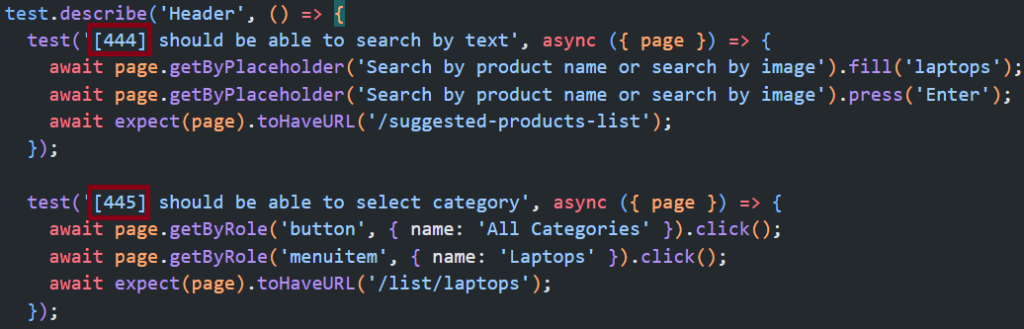
  <li>Add the ID in brackets to the test case title. 444, 445 in this example:</li>
</ol>

<p><img src="/content/uploads/2023/09/annotation-test-id-1024x329.png" alt="Annotation test ID showing Playwright tests with Azure Test Plan IDs in brackets" class="img-fluid" /></p>

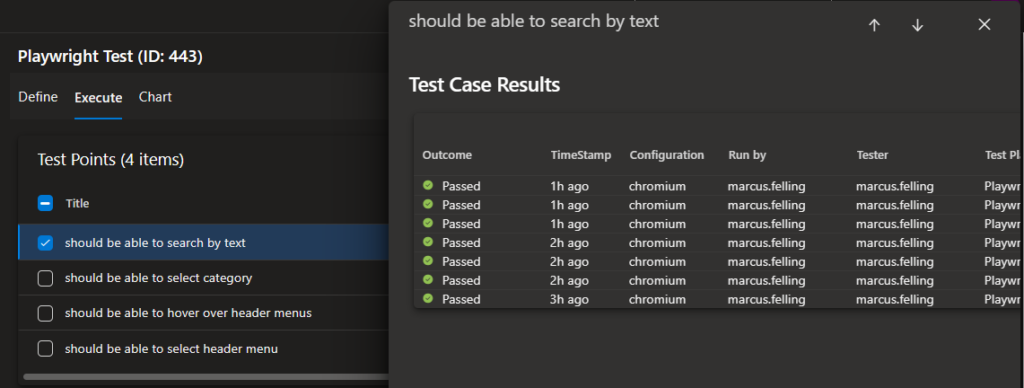
<p>When these tests get run, you will then be able to see the outcome for each test case:</p>

<p><img src="/content/uploads/2023/09/outcome-1024x388.png" alt="" class="img-fluid" /></p>

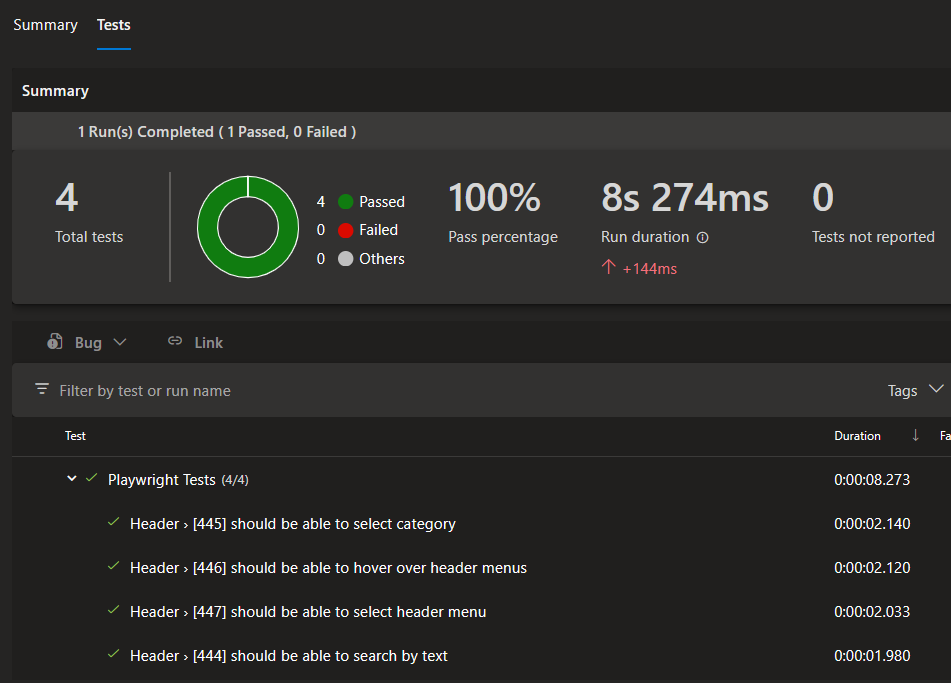
<p>My example pipeline runs these tests for every commit on main and also uses the JUnit reporter to publish results to the pipeline’s Test tab:</p>

<p><img src="/content/uploads/2023/09/test-tab.png" alt="" class="img-fluid" /></p>

<h2 id="playwright-net">Playwright .NET</h2>

<p>This option works out of the box but has some caveats and complexity: A Windows runner and a release pipeline are required to use the Visual Studio test platform installer and Visual Studio Test tasks. Also, Visual Studio must be used to associate test cases.</p>

<p>Here is how I set this up in my example project:</p>

<ol>
  <li>Manually create new Azure Test Plans test cases</li>
  <li>
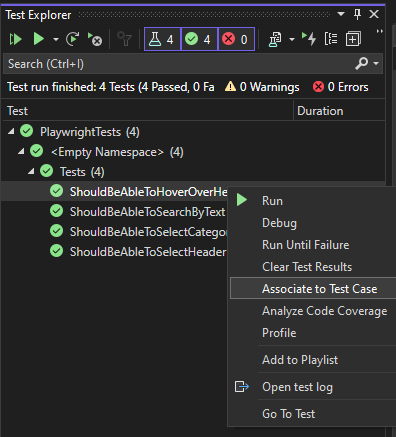
    <p>Use Visual Studio’s test explorer to associate the automated test cases:</p>

    <p><img src="/content/uploads/2023/09/associate-test-case.png" alt="" class="img-fluid" /></p>

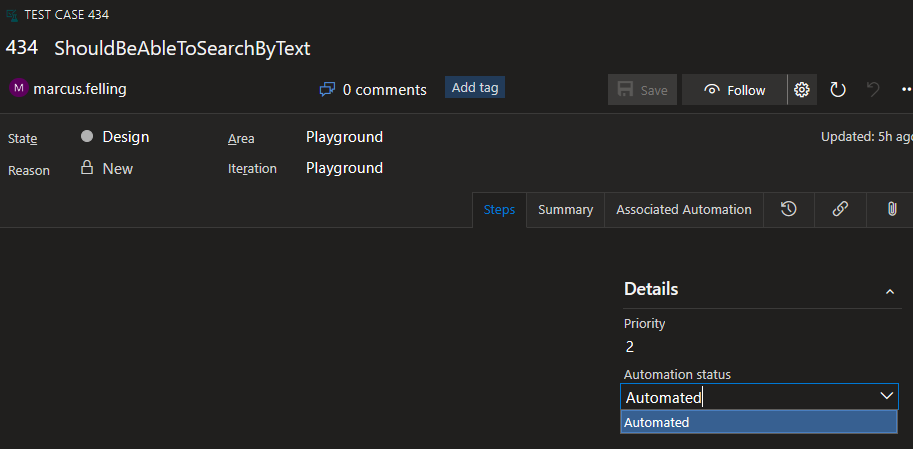
    <p>This will change the Automation status field on the test case work item to automated:</p>

    <p><img src="/content/uploads/2023/09/automation-status.png" alt="" class="img-fluid" /></p>

    <p>Once the test cases are configured, we can set up our pipelines to run the tests.</p>
  </li>
  <li>
    <p>Create a build pipeline that runs <code class="language-plaintext highlighter-rouge">dotnet publish</code> (using Windows agent) in order to create an artifact with the Playright binaries: <a href="https://dev.azure.com/marcusfelling/Playground/_git/PlaywrightDotnet?path=/playwright-dotnet.yml">playwright-dotnet.yml</a></p>
  </li>
  <li>
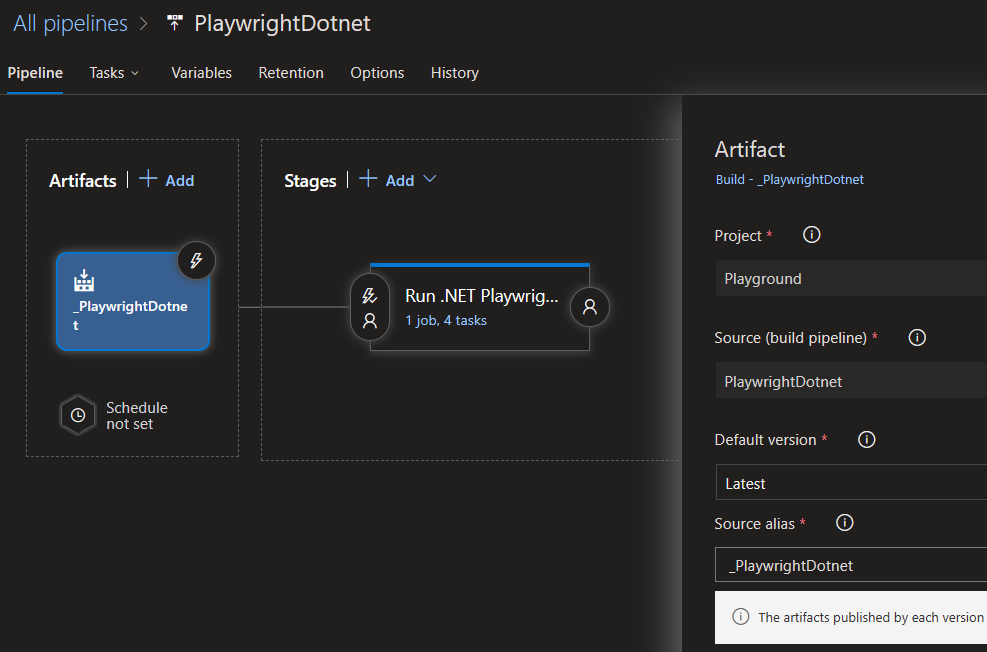
    <p>Create a <a href="https://dev.azure.com/marcusfelling/Playground/_releaseDefinition?definitionId=2&amp;_a=definition-tasks&amp;environmentId=4">release pipeline</a> referencing the artifact created in the previous step:</p>

    <p><img src="/content/uploads/2023/09/artifact.png" alt="" class="img-fluid" /></p>
  </li>
  <li>
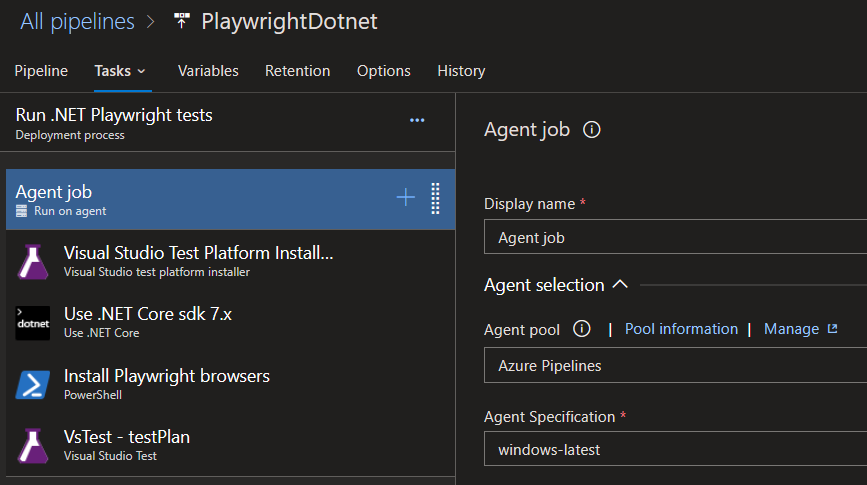
    <p>Add install tasks (that run on Windows agent) for “Visual Studio Test Platform Installer” (prereq for VS Test task), .NET, and Playwright browsers:</p>

    <p><img src="/content/uploads/2023/09/tasks.png" alt="" class="img-fluid" /></p>
  </li>
  <li>
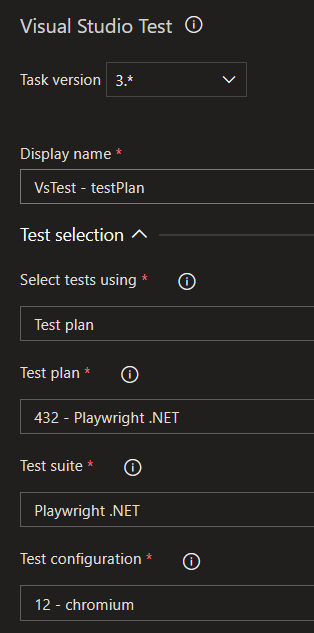
    <p>Add the VS Test task and reference your test plan:</p>

    <p><img src="/content/uploads/2023/09/vstest-task.png" alt="" class="img-fluid" /></p>
  </li>
  <li>
    <p>Create a new release to run the tests. Example results: <a href="https://dev.azure.com/marcusfelling/Playground/_releaseProgress?_a=release-environment-extension&amp;releaseId=12&amp;environmentId=12&amp;extensionId=ms.vss-test-web.test-result-in-release-environment-editor-tab">Test tab</a>, <a href="https://dev.azure.com/marcusfelling/Playground/_testPlans/_results?testCaseId=434&amp;contextPointId=31">test plan results</a>.</p>

    <p><img src="/content/uploads/2023/09/test-case-results.png" alt="" class="img-fluid" /></p>
  </li>
</ol>

<h2 id="summary">Summary</h2>

<p>Hopefully, you were able to follow my examples to get this set up in your own environment. I’d love to hear feedback on anything I may have missed, new features you’d like to see from the product team at Microsoft, or interesting use cases you have experience with.</p>

<p>Happy testing,
Marcus</p>]]></content><author><name>Marcus Felling</name></author><category term="Azure DevOps" /><category term="Playwright" /><summary type="html"><![CDATA[In 2020, I blogged about associating automated tests with Azure Test Cases. The post had 18 questions, which indicates there is still confusion on how this works, especially how to set it up with Playwright (which was pre-stable release at the time).]]></summary></entry><entry><title type="html">Measuring Website Performance with Playwright Test and Navigation Timing API</title><link href="https://marcusfelling.com/blog/2023/measuring-website-performance-with-playwright-test-and-navigation-timing-api/" rel="alternate" type="text/html" title="Measuring Website Performance with Playwright Test and Navigation Timing API" /><published>2023-04-27T10:40:19-04:00</published><updated>2023-04-27T10:40:19-04:00</updated><id>https://marcusfelling.com/blog/2023/measuring-website-performance-with-playwright-test-and-navigation-timing-api</id><content type="html" xml:base="https://marcusfelling.com/blog/2023/measuring-website-performance-with-playwright-test-and-navigation-timing-api/"><![CDATA[<p>I was recently tasked with measuring the impact of a Redis cache on an e-commerce site. This was pretty simple with <a href="https://azure.microsoft.com/en-us/products/load-testing/">Azure Load Testing</a>, by comparing the results of 2 sites, one with cache, and one without. However, to better exercise the site and understand the user experience, I wanted also to use Playwright.</p>

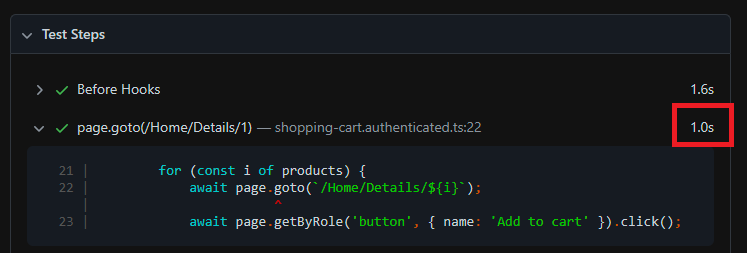
<p>Playwright already has useful features built in to report on things like the HTML report test step timing and the trace viewer that includes the call duration of each action.</p>

<p><img src="/content/uploads/2023/04/test-step-example.png" alt="" class="img-fluid" /></p>

<p>HTML report test step duration</p>

<p>I wanted to take this a step further by using the Navigation Timing API, measuring start to loadEventEnd. All of the examples I found online used <a href="https://developer.mozilla.org/en-US/docs/Web/API/Performance/timing">performance.timing</a>, which is now deprecated. This is a very simple code snippet, but posting this will hopefully help others find a solution faster.</p>

<p>Here we have a function <strong>measurePerformance</strong> that can be called inside any test case to get navigation start to load event end times. This could easily be wrapped in a conditional to fail the test based on times. In my case, I just wanted it to be surfaced in the HTML report as a custom annotation to compare between sites, by toggling baseURL.</p>

<script src="https://gist.github.com/MarcusFelling/88f8ddde9941ec1cef19667892dbe2d0.js"></script>

<p>As a result, this is what the HTML report looks like:</p>

<p><img src="/content/uploads/2023/04/performance-playwright-html-report.png" alt="" class="img-fluid" /></p>

<p>Happy testing!</p>]]></content><author><name>Marcus Felling</name></author><category term="Playwright" /><summary type="html"><![CDATA[I was recently tasked with measuring the impact of a Redis cache on an e-commerce site. This was pretty simple with Azure Load Testing, by comparing the results of 2 sites, one with cache, and one without. However, to better exercise the site and understand the user experience, I wanted also to use Playwright.]]></summary></entry><entry><title type="html">6 Nifty GitHub Actions Features 🚀</title><link href="https://marcusfelling.com/blog/2023/6-nifty-github-actions-features/" rel="alternate" type="text/html" title="6 Nifty GitHub Actions Features 🚀" /><published>2023-03-08T14:23:17-05:00</published><updated>2023-03-08T14:23:17-05:00</updated><id>https://marcusfelling.com/blog/2023/6-nifty-github-actions-features</id><content type="html" xml:base="https://marcusfelling.com/blog/2023/6-nifty-github-actions-features/"><![CDATA[<p>I’ve been having a lot of fun with GitHub Actions lately and wanted to document some of the features I regularly use, including some tips and tricks.</p>

<h2 id="1-create-separate-environments-for-development-staging-and-production">1. Create separate environments for development, staging, and production</h2>

<p>GitHub Actions has an <a href="https://docs.github.com/en/actions/deployment/targeting-different-environments/using-environments-for-deployment">environments feature</a> to describe a deployment target such as dev, staging, or production. By referencing the environment in a job, you can take advantage of <a href="https://docs.github.com/en/actions/deployment/targeting-different-environments/using-environments-for-deployment#environment-protection-rules">protection rules</a> and/or <a href="https://docs.github.com/en/actions/deployment/targeting-different-environments/using-environments-for-deployment#environment-secrets">secrets</a> that get scoped to the environment. Some potential use cases include requiring a particular person or team to approve workflow jobs that reference an environment (e.g. manual approval before production deploy), or limiting which branches can deploy to a particular environment. I also like to set the environment URL so it’s easily accessible from the summary page:</p>

<p><img src="/content/uploads/2023/03/image.png" alt="" class="img-fluid" /></p>

<h2 id="2-establish-workflow-breakpoints-with-dependencies">2. Establish workflow breakpoints with dependencies</h2>

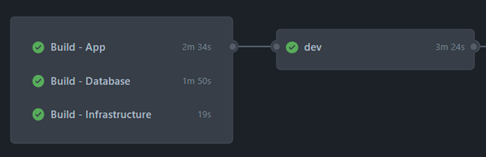
<p>By default, GitHub Actions runs multiple commands simultaneously. However, you can utilize the <code class="language-plaintext highlighter-rouge">needs</code> keyword to <a href="https://docs.github.com/en/actions/learn-github-actions/managing-complex-workflows#creating-dependent-jobs">create dependencies between jobs</a>, meaning that if a job fails (e.g. tests), dependent jobs won’t run. This also helps you control jobs which jobs run in parallel; if there aren’t dependencies between steps, break them out into separate jobs, then set their <code class="language-plaintext highlighter-rouge">needs</code> to the next step in the process.</p>

<p>e.g. my app, database, and infra as code projects can be built at the same time before deploying to dev:</p>

<p><img src="/content/uploads/2023/03/image-1.png" alt="" class="img-fluid" /></p>

<h2 id="3-use-secrets-to-store-sensitive-workflow-data">3. Use secrets to store sensitive workflow data</h2>

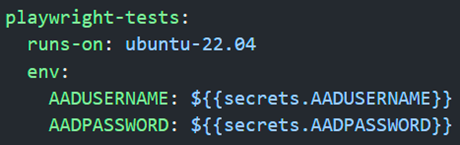
<p>GitHub’s secrets allow you to securely store sensitive data, including passwords, tokens, certificates, etc. You can directly reference secrets in workflows, meaning that you can create and share workflows with colleagues that employ secrets for secure values without hardcoding them directly into YAML workflow files. I like to scope the secrets close to the steps that require them. For example, rather than setting a secret for the entire workflow to access, it can be set for the job that contains steps that reference the secret.</p>

<p>e.g. Only the Playwright test job needs to reference AzureAD creds:</p>

<p><img src="/content/uploads/2023/03/image-2.png" alt="" class="img-fluid" /></p>

<h2 id="4-conditionals-can-aid-in-differences-between-environments">4. Conditionals can aid in differences between environments</h2>

<p>GitHub Actions allows you to use conditionals that employ the “if” keyword to decide whether a step should run. You can use this feature to develop dependencies so that if a dependent job fails, the workflow can continue running. You can also use specific built-in functions for data operations, as well as leverage status check functions to determine whether preceding steps have succeeded, failed, canceled, or disrupted. Moreover, you can use conditionals to share workflow data among different branches and forks, with steps tailored to different triggers or environments. The conditions can also be set in reusable workflows to toggle different steps between environments:</p>

<p>e.g. I want reusable workflows to be uniform across environments, with the exception of steps that are only based on environmentName conditionals:</p>

<script src="https://gist.github.com/MarcusFelling/a24904731e73dd9b2bddeade2c459948.js"></script>

<h2 id="5-share-data-between-jobs-to-aid-in-build-once-deploy-many">5. Share data between jobs to aid in “build once, deploy many”</h2>

<p>GitHub Actions enables you to share data between jobs in any workflow as <a href="https://docs.github.com/en/actions/using-workflows/storing-workflow-data-as-artifacts">artifacts</a>, which are linked to the workflow run where they are produced. This can help simplify the creation of workflows and facilitate the development of more complex automation where one workflow informs another via dependencies or conditionals. This also helps enable the mantra “build once, deploy many”. In other words, build projects in an environment-agnostic fashion, upload them as artifacts, then all deployment jobs use the same set of artifacts across environments.</p>

<h2 id="6-use-contexts-to-access-workflow-information">6. Use contexts to access workflow information</h2>

<p><a href="https://docs.github.com/en/actions/learn-github-actions/contexts">Contexts </a>represent a group of variables that can access details about workflow runs, runner environments, jobs, and steps to help derive key information about workflow operations. Contexts use expression syntax such as ${{ }}, and you can use most of them at any point in the workflow. I like to dump the entire context at the beginning of jobs to aid in troubleshooting:</p>

<script src="https://gist.github.com/MarcusFelling/01d9e6ed08b3677b9aad5adb3a624aca.js"></script>

<h2 id="wrapping-up">Wrapping up</h2>

<p>I’m curious to learn about other ways folks are leveraging GitHub Actions features. Add a comment to this post with any tips or tricks you’ve used with GitHub Actions!</p>]]></content><author><name>Marcus Felling</name></author><category term="GitHub Actions" /><category term="CICD" /><summary type="html"><![CDATA[I’ve been having a lot of fun with GitHub Actions lately and wanted to document some of the features I regularly use, including some tips and tricks.]]></summary></entry><entry><title type="html">Handling Azure AD/Entra ID Authentication with Playwright</title><link href="https://marcusfelling.com/blog/2023/handling-azure-ad-authentication-with-playwright/" rel="alternate" type="text/html" title="Handling Azure AD/Entra ID Authentication with Playwright" /><published>2023-02-21T14:29:38-05:00</published><updated>2023-02-21T14:29:38-05:00</updated><id>https://marcusfelling.com/blog/2023/handling-azure-ad-authentication-with-playwright</id><content type="html" xml:base="https://marcusfelling.com/blog/2023/handling-azure-ad-authentication-with-playwright/"><![CDATA[<p>One of the most frequently asked questions I get is how to test web apps that use Azure AD/Entra ID. Rather than repeating myself, I figured I’d write a blog post to expand on the <a href="https://playwright.dev/docs/auth">official docs</a>.</p>

<p><em>NOTE: the creepy feature image for this post was generated via <a href="https://openai.com/dall-e-2/">DALL-E</a></em></p>

<h2 id="environment-variables">Environment Variables</h2>

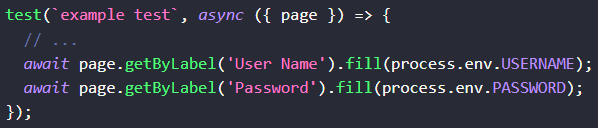
<p>Storing secrets in plain text in our code or configuration files can pose a significant security risk, especially if we share our code with others or publish it on public repositories like GitHub. Instead, we can store the credentials of our test accounts using environment variables. The environment variables are then referenced in our tests using the process core module of Node.js:</p>

<p><img src="/content/uploads/2023/02/process-node-core-module.png" alt="" class="img-fluid" /></p>

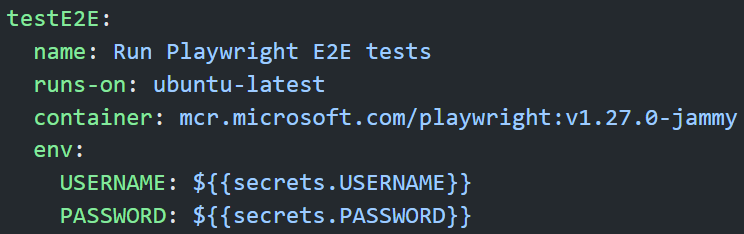
<p>To set the values of these variables we can use our CI system’s secret management. For GitHub Actions, setting the values in the pipeline would look something like this:</p>

<p><img src="/content/uploads/2023/02/gha-secrets-playwright.png" alt="" class="img-fluid" /></p>

<p><em>example GitHub Actions workflow setting env vars scoped to job</em></p>

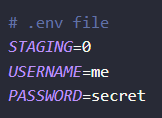
<p>To make local development easier, we can use <a href="https://github.com/motdotla/dotenv">.env files</a> that are added to .gitignore to make sure they don’t get committed to source control.</p>

<p><img src="/content/uploads/2023/02/example-dotenv-file.png" alt="" class="img-fluid" /></p>

<p><em>example .env file with key-value pairs</em></p>

<h2 id="tips">Tips</h2>

<ul>
  <li>As a starting point, use <a href="https://playwright.dev/docs/codegen-intro">codegen</a> to walk through logging in, then refactor.</li>
  <li>Create a new tenant for testing and turn off MFA and security defaults. MFA cannot be fully automated and requires manual intervention.</li>
  <li>Optionally, set <a href="https://learn.microsoft.com/en-us/azure/active-directory/conditional-access/overview">conditional access policies</a> on your test environment to bypass login, then have a separate environment and tests for the login scenario itself.</li>
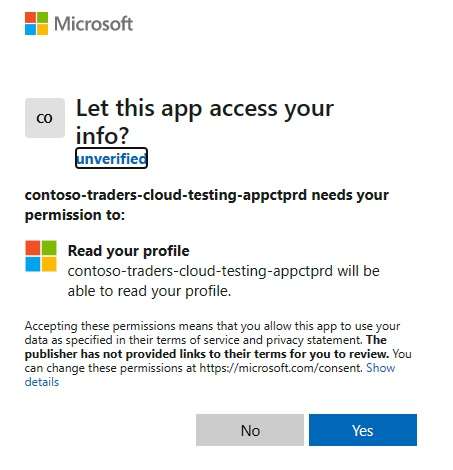
  <li>
    <p>The test account will need to be granted permission to the app under test for the first time. You can either add conditionals to your test script (if X locator is present, then click Yes) to account for this or manually log in once to grant permissions. This is a one-time step.</p>

    <p><img src="/content/uploads/2023/02/aad-app-permissions.jpg" alt="Azure AD App Permissions for login auth" /></p>
  </li>
</ul>

<script src="https://gist.github.com/MarcusFelling/b28e64cc083aac32311ba5721deee14f.js"></script>

<ul>
  <li>Auth can be set up to run at various stages of test execution. <s>If all of your tests require auth, I’d recommend logging in once and re-using the signed-in state via [global setup](https://playwright.dev/docs/auth#reuse-signed-in-state). If only a subset of tests requires auth, you can use a [beforeAll hook](https://playwright.dev/docs/auth#reuse-the-signed-in-page-in-multiple-tests) or [fixture](https://playwright.dev/docs/test-fixtures).</s><br />
  <strong>**EDIT**:</strong> As of 1.31, Playwright now has <a href="https://playwright.dev/docs/release-notes#new-apis">test project dependencies</a>, which allows you to perform setup in a more advantageous approach compared to a global setup script (e.g. produce traces and HTML report). Docs now have example scripts to walk through this: <a href="https://playwright.dev/docs/auth#basic-shared-account-in-all-tests">https://playwright.dev/docs/auth#basic-shared-account-in-all-tests</a></li>
</ul>

<h2 id="example-setup">Example setup</h2>

<p>Create auth.setup.ts</p>

<script src="https://gist.github.com/MarcusFelling/ac5486defbafd734ee23783859658c13.js"></script>

<p>Update playwright.config.ts with project dependencies, so the script above gets run before tests that need to be authenticated:</p>

<script src="https://gist.github.com/MarcusFelling/dbb6b893676b181ed849308bed707fbc.js"></script>

<p>When the tests get run, the following will happen:</p>

<ol>
  <li>auth.setup.ts logs into AAD/Entra ID using creds from env variables</li>
  <li>the signed-in state is saved to file storageState.json</li>
  <li>the browser context for all of the test cases is created using the already logged-in state via storageState.json</li>
</ol>

<p>With this setup, we reduce the test execution time by only logging in once, rather than in every individual test case.</p>

<h2 id="wrapping-up">Wrapping up</h2>

<p>I’m curious to learn about other ways that people are handling AAD/Entra ID authentication in their Playwright tests. If you have experience with this, I’d love to hear about the challenges you faced and the solutions you came up with. Your insights could be valuable to others who are also working on Playwright test automation and facing similar issues.</p>

<p>Happy testing!</p>]]></content><author><name>Marcus Felling</name></author><category term="Playwright" /><summary type="html"><![CDATA[One of the most frequently asked questions I get is how to test web apps that use Azure AD/Entra ID. Rather than repeating myself, I figured I’d write a blog post to expand on the official docs.]]></summary></entry><entry><title type="html">25 reasons to choose Playwright as your next web testing framework</title><link href="https://marcusfelling.com/blog/2022/25-reasons-to-choose-playwright-as-your-next-web-testing-framework/" rel="alternate" type="text/html" title="25 reasons to choose Playwright as your next web testing framework" /><published>2022-04-13T12:44:00-04:00</published><updated>2022-04-13T12:44:00-04:00</updated><id>https://marcusfelling.com/blog/2022/25-reasons-to-choose-playwright-as-your-next-web-testing-framework</id><content type="html" xml:base="https://marcusfelling.com/blog/2022/25-reasons-to-choose-playwright-as-your-next-web-testing-framework/"><![CDATA[<p>I wanted a place to capture a list of highlights that make Playwright awesome. Here it is, in no particular order:</p>

<ol>
  <li>Supports testing scenarios for <a href="https://playwright.dev/docs/pages#multiple-pages">multi-tab</a>, <a href="https://playwright.dev/docs/test-auth#multiple-signed-in-roles">multi-user</a>, multi-origin/domain, and <a href="https://playwright.dev/docs/frames">iframes</a>. <em>“Playwright is an out-of-process automation driver that is not limited by the scope of in-page JavaScript execution”</em></li>
  <li>Uses the concept of <a href="https://playwright.dev/docs/browser-contexts">browser contexts </a>(equivalent to a brand new browser profile) to run tests in isolation with zero overhead (super fast!).</li>
  <li><a href="https://marketplace.visualstudio.com/items?itemName=ms-playwright.playwright">VS Code extension</a> has features to run tests with a single click, debug step by step, explore selectors, and record new tests (codegen).</li>
  <li><a href="https://playwright.dev/docs/release-notes#html-report-update">HTML report</a> to view execution results in your browser. Includes visual diffs, and artifacts like traces, error logs, video recordings, and screenshots. The entire report is a self-contained page that can be <a href="https://marcusfelling.com/blog/2021/publishing-playwright-test-results-to-github-pages/">easily hosted anywhere</a>.</li>
  <li>Fastest test execution time in <a href="https://rag0g.medium.com/cypress-vs-selenium-vs-playwright-vs-puppeteer-speed-comparison-73fd057c2ae9">Checkly’s benchmarks</a> versus Cypress, Selenium, and Puppeteer.</li>
  <li>Built-in <a href="https://playwright.dev/docs/test-snapshots">toMatchScreenshot()</a> to support visual regression testing, with <a href="https://github.com/microsoft/playwright/issues?q=+label%3Afeature-visual-regression-testing+">recent improvements such as disabling animations and masking elements</a>.</li>
  <li><a href="https://playwright.dev/docs/test-parallel">Parallel test execution</a> is supported locally, or remotely for grids such as Selenium Grid. In addition, you can <a href="https://playwright.dev/docs/test-parallel#shard-tests-between-multiple-machines">shard tests between machines</a> to run different tests in parallel e.g. using a <a href="https://docs.github.com/en/github-ae@latest/actions/using-jobs/using-a-build-matrix-for-your-jobs">GitHub Action CI job matrix.</a></li>
  <li>Async test code uses standard JavaScript async/await syntax.</li>
  <li><a href="https://playwright.dev/docs/browsers">Cross-browser compatibility</a> for Chromium, Chrome, Microsoft Edge, Firefox, WebKit.</li>
  <li>Built and maintained by Microsoft ♥️ Ok, I’m probably being biased here…</li>
  <li>Multi-language support: <a href="https://playwright.dev/docs/intro">JavaScript, TypeScript</a> (<a href="https://playwright.dev/docs/test-typescript">no transpilation required</a>), <a href="https://playwright.dev/dotnet/docs/intro">.NET</a>, <a href="https://playwright.dev/python/docs/intro">Python</a>, <a href="https://playwright.dev/java/docs/intro">Java</a>, and <a href="https://github.com/playwright-community/playwright-go">Go</a> (supported by the community).</li>
  <li><a href="https://playwright.dev/docs/trace-viewer">Tracing</a> that helps with troubleshooting test runs in a post-mortem manner. This works great to repro failed CI tests.</li>
  <li><a href="https://playwright.dev/docs/auth">Re-use signed-in state</a> so tests can start as a logged-in user, saving time.</li>
  <li><a href="https://playwright.dev/docs/emulation">Emulation</a> for mobile devices, user agents, locales &amp; timezones, permissions, geolocation, and dark/light mode.</li>
  <li>Works well with the <a href="https://en.wikipedia.org/wiki/White-box_testing">white-box testing</a> approach to <a href="https://playwright.dev/docs/selectors#best-practices">prioritize user-facing attributes</a> like text, instead of CSS selectors that can change frequently.</li>
  <li>Support for <a href="https://playwright.dev/docs/test-api-testing">API Testing</a>, to do things in your e2e test like set up data or assert things like response code = 200.</li>
  <li>Stub and mock network requests with <a href="https://playwright.dev/docs/network">network interception</a>.</li>
  <li>Actions have <a href="https://playwright.dev/docs/actionability">auto-waiting built-in</a>, so you don’t need to rely on hard-coded sleep commands that can cause flakiness and slow down tests. Also has <a href="https://playwright.dev/docs/navigations#custom-wait">custom waits</a> such as until an element is visible, or until a pop-up is loaded.</li>
  <li>Support for recording user actions as Playwright test code aka <a href="https://playwright.dev/docs/codegen">Test Generator</a>, that can be run via CLI or the <a href="https://marketplace.visualstudio.com/items?itemName=ms-playwright.playwright#record-new-tests">record button in VS Code</a>.</li>
  <li>Supports device-specific events like <a href="https://playwright.dev/docs/api/class-locator#locator-hover">hovering with mouse</a>, <a href="https://playwright.dev/docs/api/class-locator#locator-tap">tapping on mobile</a>, and <a href="https://playwright.dev/docs/api/class-locator#locator-press">keyboard shortcuts</a>.</li>
  <li><a href="https://playwright.dev/docs/input#upload-files">Upload</a> and <a href="https://playwright.dev/docs/downloads">download</a> files supported out of the box.</li>
  <li>The <a href="https://marcusfelling.com/blog/2022/create-more-reliable-playwright-tests-with-locators/">magic of Locators</a> eliminates flakiness caused by dynamic controls.</li>
  <li>Playwright Test uses the same Expect assertion library as Jest which will be familiar to many JS devs.</li>
  <li>Supports <a href="https://playwright.dev/docs/test-annotations#tag-tests">tagging of tests</a> so you can run groups of related tests e.g. <code class="language-plaintext highlighter-rouge">@priority=high</code>, <code class="language-plaintext highlighter-rouge">@duration=short</code>.</li>
  <li>Provides <a href="https://playwright.dev/docs/docker">docker images</a> that have dependencies and browsers baked in. This makes <a href="https://playwright.dev/docs/ci">CI configuration</a> simple and fast.</li>
</ol>

<p>Did I miss anything? Post your thoughts in the comments…</p>

<p>Happy testing!</p>

<p><strong>EDIT</strong>: I wanted to add a comment from a former colleague (<a href="https://www.linkedin.com/in/adam-bjerstedt-45536835/">Adam Bjerstedt</a>), with his list of Playwright favorites, in comparison to Selenium:</p>

<blockquote>
  <p>1.) Playwright treats locators as a first-class citizen and eliminates stale elements. Selenium finds the pointer to the DOM element and then passes that around; whereas Playwright passes the locator to the action/assertion.<br />
2.) Playwright has baked in implicit waits without the problems that Selenium has for negative tests.<br />
3.) Playwright allows super powerful frame handling.<br />
4.) Playwright has built-in mocking which allows you to write minified e2e tests at the component level (you don’t even need to use the component testing aspect).<br />
5.) Playwright is so fast that we have to manually handle race conditions at times.<br />
6.) Playwright supports powerful pseudo-CSS selectors that replace the only use cases for xpath (searching by text and traversing up the DOM). Xpath leads to many terrible habits and should be avoided.<br />
7.) Playwright supports automation IDs as a first-class citizen. (Granted I still use them as data attributes so that I can write compound selectors).</p>
</blockquote>]]></content><author><name>Marcus Felling</name></author><category term="Playwright" /><summary type="html"><![CDATA[I wanted a place to capture a list of highlights that make Playwright awesome. Here it is, in no particular order:]]></summary></entry></feed>