Add an llms.txt File to Your Website
When an AI tool tries to pull information from your site, it’s scraping HTML. Nav bars, footers, cookie banners, all of it, just to find the actual content. That works, but it’s messy.
llms.txt is a proposed standard that gives AI tools a clean Markdown overview of your site. Think of it like a table of contents they can read instead of guessing. I added one to this blog. Took about five minutes.
What is llms.txt?
You drop a Markdown file at /llms.txt on your site. It lists who you are, what content you have, and where to find it. That’s basically it.
The format:
- H1: Your site or project name
- Blockquote: A short description
- Sections: Links to your content with brief descriptions
No schema, no JSON-LD, no build tools.
What It Looks Like
Here’s a minimal example for a documentation site:
# Contoso API

> REST API for managing widgets. Supports CRUD operations,
> batch processing, and webhook subscriptions.

## Docs

- [Getting Started](https://contoso.dev/docs/start): Authentication,
  first request, response format
- [Endpoints Reference](https://contoso.dev/docs/endpoints): Full
  endpoint list with parameters and examples
- [Webhooks](https://contoso.dev/docs/webhooks): Event types,
  payload schemas, retry behavior

## SDKs

- [Node.js SDK](https://contoso.dev/sdk/node): npm package, usage
- [Python SDK](https://contoso.dev/sdk/python): pip package, usage
An AI tool can read that instantly instead of crawling every page and hoping for the best.
Works for pretty much any site: personal blogs, API docs, open source projects, product pages, knowledge bases.
You’ll also see names like llms-full.txt floating around. Those are generated context files that some tooling produces from your manifest, not something you need to create yourself.
Why It Matters
Say someone asks Copilot “how do I authenticate with the Contoso API.” Without llms.txt, Copilot crawls the site, guesses which page has the auth docs, parses HTML, and maybe ends up on the changelog. With llms.txt, it reads the manifest, sees “Getting Started” covers authentication, and goes straight there.
That gap gets wider on sites with complex navigation, SPAs that don’t render without JavaScript, or content hidden behind tabs and accordions.
Adding It To Your Site
At its simplest, it’s a text file at your site root. You could write it by hand and be done.
For sites where content changes often, you’ll probably want to generate it. Most static site generators can handle this. The llms.txt site has examples for different stacks.
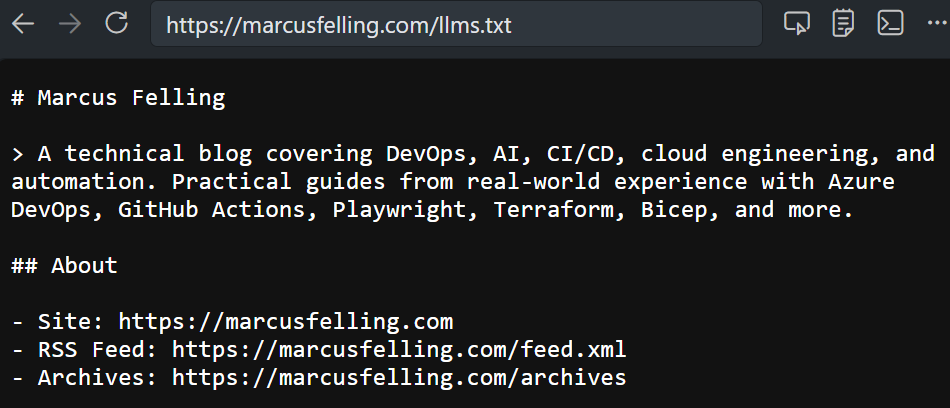
I went the generated route. Jekyll loops over my posts at build time and writes the file automatically. Similar to how I set up an AI agent squad for this repo. Here’s a shortened version of what comes out at marcusfelling.com/llms.txt:
# Marcus Felling

> A technical blog by Marcus Felling covering DevOps, CI/CD,
> cloud engineering, and automation.

## About

- Site: https://marcusfelling.com
- RSS Feed: https://marcusfelling.com/feed.xml
- Archives: https://marcusfelling.com/archives

## Posts

- [Add an llms.txt File to Your Website](https://marcusfelling.com/blog/2026/your-website-should-have-an-llms-txt-file): I added an
  llms.txt file to this site so AI tools have a clean map...
- [Building an AI Agent Squad for Your Repo](https://marcusfelling.com/blog/2026/building-an-ai-agent-squad-for-your-repo): What if your
  repo had a whole team of AI agents...
New post goes up, the file regenerates. Nothing to maintain.
llms.txt vs robots.txt
Different jobs. robots.txt tells crawlers what they’re allowed to access. llms.txt tells AI tools what’s useful to read. They’re complementary. Have both.
If you’re already blocking AI crawlers in robots.txt (reasonable), llms.txt still works as a curated summary for tools that explicitly look for it. It’s not access control and it doesn’t guarantee anything, but it gives well-behaved clients a better starting point than blind crawling.
Why Bother?
Fair question. The spec is early and not every tool checks for it yet. But:
- It costs nothing. One file, basically zero maintenance.
- It already helps. AI coding assistants and research tools are consuming web content constantly. A clean manifest gives them a head start.
- This isn’t going away. Even if
llms.txtspecifically doesn’t win, machine-readable content summaries for AI tools are clearly the direction things are moving.
Five minutes of work for a file that might make your content more useful to every AI tool that visits your site. I’ll take that trade.